
Photography sales software for Windows
Help your clients choose their favorites.
Keep track of what they want to order.
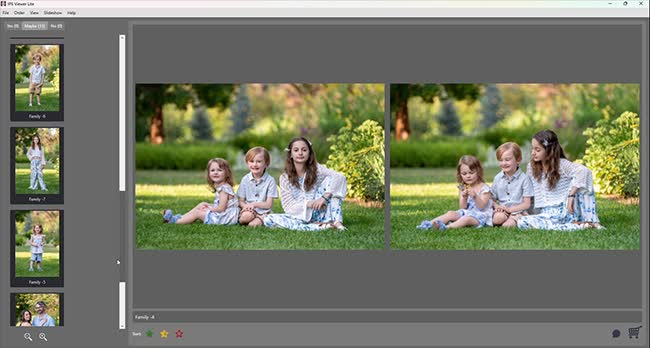
Compare photos side by side, set aside the favorites, and add prints to the order as you go. IPS Viewer gives you one place to handle the details of an in-person sales appointment.
$189. One-time purchase. No subscription.
For Windows. Install on up to 3 computers. 14-day money-back guarantee.

“An 8×10 of this one. And two for the grandparents.”
That’s the kind of detail you want to get right. Your client is choosing photos, thinking about gifts, and deciding what goes on the wall. You’re helping them along and keeping track of it all.
With IPS Viewer, you can compare similar shots, mark the ones they like, and record each product, size, and quantity while you’re looking at the photo together.
Take a look at how it works.
These short videos walk through choosing photos and putting an order together.
Compare photos
Put two expressions side by side.
Show similar photos together so your client can take a closer look and choose the one they prefer.
Choose favorites
Keep the favorites. Come back to the maybes.
Mark photos Yes, Maybe, or No as you go. When your client isn’t sure, leave the photo in Maybe and return to it later.
Build the order
Add the print while you’re looking at the photo.
Choose a product and size, enter the quantity, and add any notes. Use the products in your price list or enter a custom item.
Review and save
Go over the order together.
Check the items, quantities, notes, and total with your client. Create a PDF order summary, then save the session so you can open it again later.
Is IPS Viewer what your studio needs?
If you need to show photos, help clients choose, and record their order, that’s what IPS Viewer is for.
If you also need room previews, frame mockups, or album layouts, you’ll need a separate design tool. The comparisons below explain the differences.
- IPS Viewer: Windows software for comparing photos and recording orders. $189 once, with no subscription.
- ProSelect: Mac and Windows software with sales and design tools. Features vary by edition.
- Swift Galleries: Browser-based sales software with wall gallery design and education.
Compare with ProSelect · Compare with Swift Galleries
Already edit in Lightroom Classic? Here’s how to use it with IPS Viewer.

Hi, I’m Chris.
I’m a photographer, educator, and the person behind IPS Viewer.
I built IPS Viewer to help with a familiar part of the job: sitting down with a client, choosing their favorite photos, and working out what they want to order. You can keep using the tools you already like for editing and taking payments.
Have a question about whether it will do what you need? Send me a message.
Chris Wooley
Photographer and creator of IPS Viewer
One purchase. No monthly payments.
Give it a try in your studio.
If it isn’t right for you, contact us within 14 days of purchase to request a refund.
IPS Viewer — $189
Install it on up to three Windows computers.
- View and compare photos.
- Sort your client’s favorites into Yes, Maybe, and No.
- Record products, sizes, quantities, and notes.
- Create PDF order summaries.
- Save sessions and open them again later.
A few things you might want to know
Is there a monthly fee?
No. IPS Viewer costs $189 once, with no monthly or annual subscription. You can install it on up to three Windows computers.
Will it work on my computer?
IPS Viewer runs on Windows. There isn’t a native Mac version. Check the system requirements below before buying. You’ll need an internet connection to download and activate it, and to check for or download updates.
Can I keep using Lightroom or Capture One?
Yes. Edit your photos as usual, export JPGs, then import that folder into IPS Viewer. The two programs don’t sync automatically, so keep filenames that let you match the order to your originals.
Can I show artwork on a client’s wall?
IPS Viewer doesn’t create room previews, frame mockups, or album layouts. If you need those tools, take a look at the ProSelect and Swift Galleries comparisons.
Can I take payments in IPS Viewer?
You’ll take payment through your usual provider. IPS Viewer lets you record the amount, method, and reference, but it doesn’t charge a card or process the payment.
Can I finish an appointment later?
Yes. Use Save Session or Save As to save an .IPS file, then open it when you’re ready to continue. Save manually as you work; sessions aren’t saved automatically.
Does the Yes count tell me how many prints were ordered?
It counts photos, not prints. One photo might be ordered in several sizes or quantities. Enter those quantities in the order and check them in Order Review.
What if IPS Viewer isn’t right for me?
Contact us within 14 days of purchase to request a refund. Include your order number and the email address you used to buy it. You can read the full refund policy for details.
Where do I start?
The help center walks you through setup, importing photos, choosing favorites, and creating an order. I’d suggest trying a small practice session before your first client appointment.
What are the Windows system requirements?
Minimum: Windows 10 or 11 (64-bit), a dual-core CPU, 8 GB RAM, integrated graphics, 10 GB of free disk space, and a 1920 × 1080 display.
Recommended: Windows 10 or 11 (64-bit), an Intel i5 or Ryzen 5 processor or better, 16 GB RAM or more, SSD storage, and dual 4K displays.
You’ll need internet access for downloading, activation, and checking for or downloading updates. There isn’t a native Mac version.
Ready to try IPS Viewer?
Bring your photos, your price list, and a practice order. See how it works before your next client appointment.
For Windows. No subscription. 14-day money-back guarantee.